

Introduction: The Challenge of Accurate Vehicle Diagnostics and What is Autodata?
Every seasoned mechanic or garage owner understands the frustration of diagnosing today’s increasingly complex vehicles. With sophisticated electronics, intricate sensors, and precise torque specifications, accurately identifying and resolving mechanical and electrical issues demands precise, reliable information. This is where diagnostic platforms such as Autodata become invaluable. But exactly what is Autodata and how does it empower mechanics to troubleshoot efficiently?
At AutoFixData, we help mechanics, automotive technicians, garage operators, and enthusiasts tackle complex vehicle issues quickly and accurately. Through reliable diagnostic platforms including Autodata, AllData, and HaynesPro, AutoFixData simplifies your repair and maintenance processes, increases productivity, and boosts customer satisfaction.
In this comprehensive article, we’ll clearly explain what is Autodata, outline common problems mechanics face during vehicle diagnostics, and present a detailed guide on how Autodata can simplify your everyday mechanical tasks.
Problem Identification: Why Accurate Technical Data Matters
One of the most persistent obstacles automotive professionals encounter today is the growing complexity of modern vehicles. Manufacturers integrate advanced electronic systems, computerized sensors, and elaborate wiring diagrams into today’s models.
According to industry statistics, nearly 40% of vehicle repairs initially misdiagnosed stem from inaccurate or incomplete technical data. Incorrect torque values, fluid specifications, and fault code interpretations lead to costly comebacks, customer dissatisfaction, and lost labor hours.
For auto repair shops and mobile mechanics alike, having precise and current information isn’t optional—it’s a requirement. Yet, getting that information effectively remains a challenge without dedicated, accurate, and user-friendly industry software.
Technical Background: What Is Autodata and Why Mechanics Trust It
Autodata is a comprehensive automotive technical database designed explicitly for vehicle diagnostics, service, repair, and maintenance tasks. Respected globally by professional mechanics and technicians, Autodata covers an extensive range of vehicles, including passenger cars, vans, and motorcycles from major manufacturers across the globe.
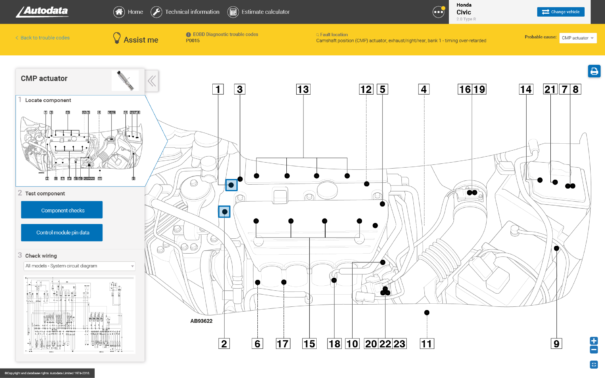
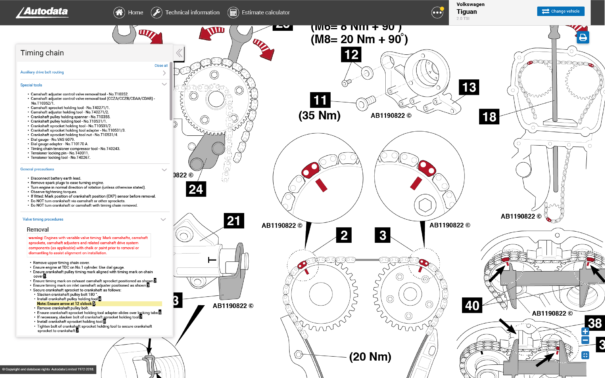
For decades, Autodata has been an industry leader, providing accurate, officially licensed repair data, diagnostic trouble code (DTC) solutions, component diagrams, and precise torque specifications straight from manufacturer guidelines. All information within Autodata is constantly updated by seasoned industry experts and sourced from respected automotive manufacturers to ensure documents remain current and accurate.
Key Information Provided by Autodata includes:
- Complete wiring diagrams & electrical schematics
- Diagnostic Trouble Code (DTC) lookup and interpretation tables
- Detailed service interval procedures and schedules
- Manufacturer-specific repair instructions and recall notices
- Component diagrams and assembly breakdowns
- Fluid capacities, specifications, and industry-standard labor times
- Precise torque settings and tightening sequences
Solution Overview: How Autodata Helps Mechanics Address Diagnostic Issues
Autohttps://autofixdata.co.uk/autodatadata’s intuitive platform simplifies the diagnostic approach significantly. Delivered digitally through a cloud-based interface, Autodata information is available instantly wherever you are, accessible via desktop, laptop, tablet, or smartphone.
Diagnostic features provided by Autodata (available through AutoFixData.com):
- Trouble Code Diagnosis & Testing Procedures: Quickly find accurate fixes recommended by manufacturers to avoid misdiagnosed trouble codes.
- Wiring & Component Diagrams: Easy-to-follow schematics drastically simplify electrical troubleshooting and reduce diagnostic guesswork.
- Component Locations & Removal Procedures: Minimize part damage and fitment issues with clear, step-by-step visual guides.
- Real-time Technical Updates: Never worry about outdated service manuals—Autodata ensures your documentation matches current industry standards.
Step-by-Step Process: Effective Diagnostic Procedure Using Autodata
With Autodata available through AutoFixData, follow this logical sequence to diagnose vehicle faults effectively.
Step 1: Perform Initial Visual Inspection
Always start physically inspecting to identify immediate/external causes (leaking fluids, loose connections, damaged components).
Step 2: Retrieve & Interpret Diagnostic Trouble Codes (DTCs)
Connect your OBD-II diagnostic scanner tool to the vehicle’s diagnostic port and run the initial system scan. Input the retrieved codes into Autodata to immediately decode their meanings.
Step 3: Refer to Autodata’s Diagnostic Flowcharts
Follow the provided manufacturer-specific procedures to systematically troubleshoot a problem by using precise step-by-step testing guidelines.
Step 4: Access Autodata Wiring Diagrams (If Needed)
Use integrated wiring diagrams within Autodata to visually confirm electrical continuity, component power supplies, and ground networks.
Step 5: Confirm Components & Replace as Recommended
Check Autodata’s detailed descriptions and locations to ensure correct removal and replacement without damage to surrounding components.
Step 6: Final Test, Clear Fault Codes, and Verify Repairs
Once repairs are completed and parts replaced, re-scan and delete DTCs utilizing your diagnostic tool. Compare your results to Autodata documentation to guarantee correct repairs.
Common Mistakes to Avoid
While Autodata significantly enhances repair efficiency, mechanics commonly stumble into these pitfalls:
- Skipping Manufacturer Recommended Procedures: Always follow Autodata’s step-by-step guidelines—taking shortcuts may cause issues and unnecessary comebacks.
- Relying on Outdated Information: Ensure all your information is current. Autodata, integrated within AutoFixData.com, keeps you informed with real-time technical updates.
- Ignoring Torque Specs & Sequence: Using inaccurate torque or overlooking bolt tightening sequences outlined clearly by Autodata can lead to critical component damage.
- Improper Troubleshooting of Electrical & Sensor Faults: Avoid costly guesswork—use precise schematics provided by Autodata whenever you troubleshoot electrical or sensor-driven problems.
Advanced Techniques: Growing Your Diagnostic Skills with Autodata
Going beyond standard repairs, advanced users of Autodata can leverage additional in-depth features:
- Engine Management System Diagnosis: Navigate complex engine management systems and pinpoint sensor anomalies.
- In-depth Wiring Diagnostics: Use interactive, zoomable wiring diagrams—deeply beneficial when diagnosing intermittent electrical faults.
- Integration with Advanced Scan Tools: Combine Autodata data with sophisticated diagnostic equipment for advanced system querying and parameter monitoring to solve complex drivability issues.
Tools and Resources Needed
To effectively leverage Autodata capabilities via AutoFixData, here’s what you’ll typically need:
- Professional-quality OBD-II Diagnostic scanner (like Autel, Launch, Snap-On)
- Digital Multimeter & Oscilloscope for electrical circuit evaluation
- Torque wrenches (digital or manual, depending on your specific tasks)
- A reliable digital device (laptop or tablet) with internet connectivity to access AutoFixData’s Autodata subscription instantly anywhere in your workshop.
Real-World Application: Autodata in Action at Mike’s Car Care Center
Mike’s Car Care Center faced repeated complaints about intermittent engine stalling on a customer’s late-model Volkswagen Golf. After initially misdiagnosing the issue with a faulty fuel pump replacement, Mike opted to utilize Autodata through AutoFixData.
By inputting the retrieved Diagnostic Trouble Code into Autodata, Mike accessed an OEM-trained procedure that identified a specific crankshaft position sensor known to cause intermittent stalls. Using the detailed removal instructions and a verified OEM wiring diagram provided by Autodata, Mike diagnosed and replaced the faulty sensor quickly and correctly, permanently resolving the customer’s issue.
Conclusion: Take Charge of Accurate Diagnostics with AutoFixData
Understanding clearly “what is Autodata” provides any mechanic a pronounced diagnostic advantage—greater accuracy, fewer return repairs, and improved customer satisfaction. Autodata’s precise, up-to-date technical information, paired with AutoFixData’s hassle-free, affordable subscription access, streamlines your workflow and positions your workshop for continued automotive excellence.
Ready to revolutionize your diagnostic and repair process today? Explore the comprehensive auto diagnostic solutions at AutoFixData.com and choose your subscription plan now: https://autofixdata.co.uk/pricing/.
FAQs
1. What Vehicles Does Autodata Cover?
Autodata provides comprehensive information covering thousands of passenger cars, vans, motorcycles, and commercial vehicles from all major global automotive brands.
2. Can DIY Mechanics Use Autodata?
While primarily designed for professional mechanics, an experienced DIY enthusiast can leverage Autodata’s user-friendly interface to accurately diagnose and repair vehicles.
3. How Frequently is Autodata Updated?
Autodata receives routine technical updates, often daily, ensuring mechanics always get access to current manufacturers’ guidance.
4. Is Specialized Training Required to Use Autodata’s Data?
No specialized formal training is necessary. Autodata provides detailed, intuitive procedures clear enough for automotive professionals with varying skill levels.
5. How Do I Access Autodata via AutoFixData.com?
Visit AutoFixData.com and select a pricing plan that suits your professional or personal needs. After subscribing, access your secure Autodata database immediately from any compatible device.




